Here is how I added inline editing for multiple rows of data to my CollectiveGTD Plone 3.0 product using KSS.
This was challenging in that it was my first KSS project, plus most of the KSS editing examples I’ve found deal with editing just one piece of content (instead of multiple rows).
Here is a screencast to whet your appetite for inline editing. Basically, CollectiveGTD has many rows of Action Items (each with Name, Start Date, Due Date, etc) that needed to be edited.
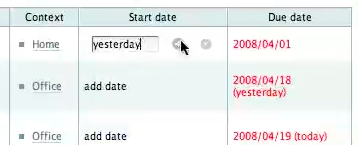 Screencast: Example of Inline Editing in CollectiveGTD
Here were the issues that needed to be solved:
How do we capture KSS events for a specific field in a specific row?
How do we display inline editing forms?
How do we handle the same row of content if it shows up in multiple places? e.g. CollectiveGTD also has a portlet which might display the same content in both the multi-row form
Here are highlights, issues and lesson’s learned:
Note: If you generally want to see all of the new KSS code in one place: svn diff -r59525:60742 https://svn.plone.org/svn/collective/CollectiveGTD/trunk
1. Converting from a plain old HTML form to a nice KSS template
Prior to adding KSS, I started with a single HTML form that allowed users to check “Done” or “Starred” fields and click “Submit” to update all the pieces of content. The goal was to replace that with KSS, plus add inline editing. To do this, I had to remove the one HTML form since you can’t have mini-inline forms inside of a big form.
 Issue: Not sure how to degrade this functionality nicely if someone doesn’t have JavaScript enabled.
I recommend creating macros for each field you’re editing, and a unique naming scheme for your inline fields.
I created 4 TAL macros (in collectivegtd_kss.pt) - one for each field to be edited with KSS. There is a lot of HTML to put in, so doing this simplifies the main page template which then just generates the page and repeats through multiple rows of data (actions_view.pt).
The first goal was to uniquely id each editable field, even if the same piece of content shows up in more than one place on the page.
To do this, each field’s CSS ID was based on the content’s short-name (to represent the specific piece of content, aka “row”) with a ‘prefix’ string (to represent the specific fieldname in case it appears in many places). For CollectiveGTD there are 4 prefixes for the main page (main_startdate, main_duedate, main_complete, main_flag) and 4 prefixes for the portlet (portlet_startdate, portlet_duedate, portlet_complete, portlet_flag).
Issue: A period in the field’s CSS ID breaks KSS. A period can appear because the short-name for a Plone piece of content can contain periods, and I’m using the short-name as the unique identifier. I haven’t fixed this one yet.
The macros require two pieces of information: ‘actionItem’ and ‘prefix’. ActionItem is a single piece of content that has all the fields a row needs. These prefix also allowed the KSS code to be able to update multiple fields if the same piece of content appears more than once. e.g. Changing Start date on the form, should also update the Start date for that items if it also appears in the portlet.
2. Inline Editing Issues
The initial tricky part of multi-row data (specifically with inline-editing) is that you can’t dynamically create KSS events for every row (nor would you want to!), so you need to structure your HTML and CSS a specific way so that when you trigger a KSS event it is smart enough to know which fields are connected with that row. My first version ended up showing and hiding all the rows forms instead of just the one I wanted.
How to hide and show the inline form:
Since inline text editing requires grouping several elements together, it’s important to group everything in one tag (e.g.
I also set each form to have these two classes to start with (editform hiddenform) so that all the form default to being hidden.
Here’s the example of the “Due Date” field:
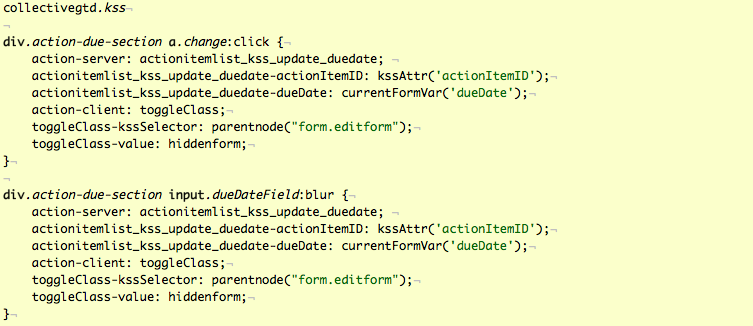
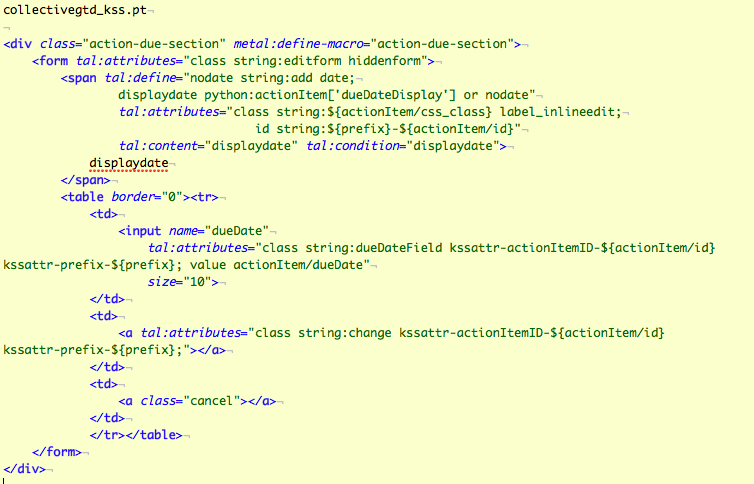
3. What happens after submitting an inline-edit form?
New ActionItemListKSS view for handling the server-side content updates
I created a new ActionItemListKSS (which subclasses PloneKSSView) to provide the server-side code to update content, and also reflect the changes back to the webpage (via those unique IDs we generated in the templates).
The unique IDs are used by our ActionItemListKSS.
The methods of my view are connected to the form via KSS (in collectivegtd.kss). The major methods include: update_dueDate(), update_startDate(), update_complete(), update_flag(). This is where a lot of code duplication happens (similar code in all 4 methods), but easy to understand.
They all basically are passed a ActionItem ID (content short-name) and the new value (via KSS magic). The method then updates the piece of content, reindexes the content to make sure the catalog is updated, then updates the webpage by doing an HTML replace for both prefixes (“main” and “portlet”). It the content only exists in one place, the other replace is ignored. Finally, a Portal Message is sent to the user to let them know what was changed. The two “inline edited” fields are naturally more complex.
Issue: This still seems like too much duplicate code is needed in ActionItemListKSS. Once I had one field working, I found myself refactoring common code as I learned KSS and discovered which code to reuse across fields. The refactoring is leading toward a view class useful for inline editing though!
Lesson Learned: I ended up adding helper functions in ActionItemListKSS to handle the individual field-level updates of content, because updating fields like Start Date and Due Date were complex because of the complex date conversion code – converting strings to dates, then converting dates back to strings. This was largely because I didn’t build individual field update code in CollectiveGTD. I started with formlib code which created new ActionItems all at once. In hindsight, it would be good to have a view that allows updating of each individual field – then it could be reused in both formlib and KSS without having to duplicate code. I still may do this refactoring at some point.
- CSS file (collectivegtd.css)
The CSS was straight-forward. Minor note: The only reason some of the selectors have a lot of options is that I was playing with CSS rollovers (where one image has both rollover states) and found some boilerplate code that looks like it works for all browsers imaginable. I’m sure some of those could be removed.
- Tests
I added tests for the ActionItemListKSS methods, but haven’t tried UI testing yet.
Conclusion
Therefore, thus…
It’s worth learning KSS because of the power it brings you without having to write JavaScript code directly.
The tricky piece was learning how the various pieces work together (KSS, PloneKSSView, and figuring out best-practices for structuring HTML and CSS), though once that is understood, it was easy to maintain the pieces separately by breaking the templates up into macros (to keep things simple and reusable), put all the server-side code in one Python class, with one KSS file that connects the two.
I hope this example provides you with what you need to avoid some of that initial learning curve.
I’m also interested in learning from KSS gurus if there is a way to simplify any of these pieces.
CollectiveGTD for Plone: Beta Release (and Screencast)
I’ve just released the beta of CollectiveGTD, and have included a screencast to provide an overview of current functionality.
This beta release of CollectiveGTD for Plone 3.0 includes new features such as:
AJAX Inline Editing using KSS
Filtering of Actions by Context tag and Project tag
An Import script that will import an iGTD CSV export and which is easy to modify for importing other formats.
The 8-minute screencast is available here: CollectiveGTD Beta 1 Screencast
The project page and link to the code is here: http://plone.org/products/collectivegtd-thoughts
Plone, Zope3 and Django Love Fest
Justin James and I presented our talk ”Plone and Django: Comparing Tools for Python Web Developers” at Seattle Plone last night to an enthused audience.
Most were familiar with just one platform or the other, so it was a great opportunity to ask questions and learn about the strengths of each platform.
New Company in a Weekend: A Skillbit.com Developer Wrap-up
What does the process look like when 80+ people get together in a weekend with the goal of building a new company and a product?
Here’s a quick overview of:
how the development process worked
the platform we picked (Python and Django)
the successful building of a complete website in two days (skillbit.com)
and what’s next.
Friday: Let’s pick a product
In just a couple of hours of product brainstorming and socializing at Seattle Startup Weekend - 120 people narrowed down the top ideas into just 4.
This was the first major decision of what became many rapidly-paced decisions. In the sense that a startup often does this entire process in a year’s time, tonight was the equivalent our first 3 months!
Saturday: Heavy lifting time
Saturday morning: We haven’t picked a development platform yet and don’t know much about what we’re building yet.
Django declared the winner partially due to the Python experience in the room, and partially because it was one of the few platforms that no one had an aversion too. After Friday night’s initial meeting, I wrote ”What about Django for Seattle Startup Weekend?” to explore this possibility. I think this is a compliment to the easy of entry for both the Python language and the Django platform. Only 3 developers in the group had extensively worked with Django, but that was enough to get various teams quickly “unstuck”. Saturday was our big learning day - we felt much more confident on Sunday.
I’m partial to Python, but was prepared to learn a Ruby on Rails if that was our chosen platform. This was the first Startup Weekend group to use Django.
Choosing the platform reminded me of the Open Space principles of “Whoever comes are the right people” and “Whatever happens is the only thing that could have”. Had there been a different mix of people, a completely different platform could have been chosen, and that would have been ok too.
What impressed me what that this diverse team of developers were all willing to give the chosen platform a hearty try even if their platform-of-choice was not picked. Nobody complained, we just made it work!
Saturday afternoon: At this point we’ve been all ramping up on Django (and Python) with the help of our experts. We all paired up into self-selected teams - pairs are nice because you have a team mate (a la Extreme Programming), plus if someone decides not to come in the next day, you have continuity.
“So what are we building, again?”
With the web development off and running, it was time to get more familiar with what we were building. The teams who have been working on mockups (in the form of whiteboard sketches that were photographed and added to Basecamp) were our next stop.
Saturday night: We’ve got ourselves a working alpha. This is beyond my expectations - in just one day we accomplished the wide range of tasks starting with choose a platform ending with an early alpha. 30 developers plus 50+ business development/marketing/designers working together.
Sunday: This is really coming together!
Sunday morning. Hard to wake up. A bit tired. I then heard about the “coup” code branch – basically a sub-group went to the bar and decided they needed to rewrite the entire database layer late Saturday into early Sunday. A bit worried at what this did to the parts of the app I was working on, but turned out to be just fine.
I spent most of the day working through templates and navigation and merging functionality with the graphic design that was in formation. This was rewarding because the site quickly goes from ugly to beautiful over the course of a few hours.
Sunday night: We actually finished by our planned 9pm launch. Core functionality is working, content is in, graphic design looking good – we even had a patent filed, though I don’t know what we actually patented. I even lucked out with 2-seconds of fame making the King 5 News segment, albeit my coffee mug (sitting next to me) had a bit more air-time.
Site is live. Time for sleep.
Some final bugs are being squashed - you’ll soon see this at http://skillbit.com
Next
A core team was chosen at the end of the event to decide where this project goes next.
 Having just recently started my own company Web Collective, Inc (in May 2007 with 6 others) my hands are full with that venture, though building a company in a weekend brings with it new relationships, new ideas, and new energy from seeing what’s possible when a group gets together to create something new.
For something a bit smaller scale, I’m interested in checking out what this Seattle group is doing: Ready, set develop: How to create a six hour startup.
Related links of interest
- Skillbit to be Launched (on TagEdge - Tech News, Venture Capital and Web 2.0)
Some Photos
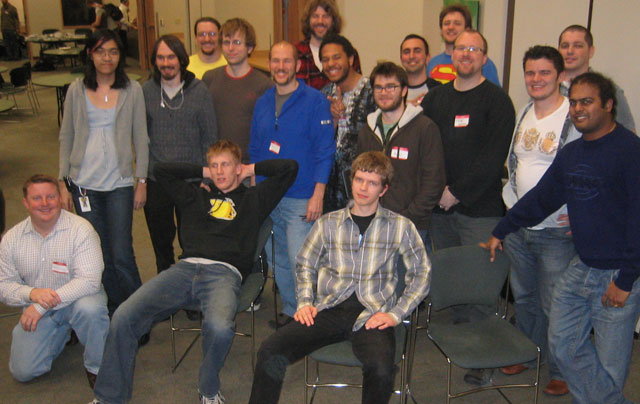
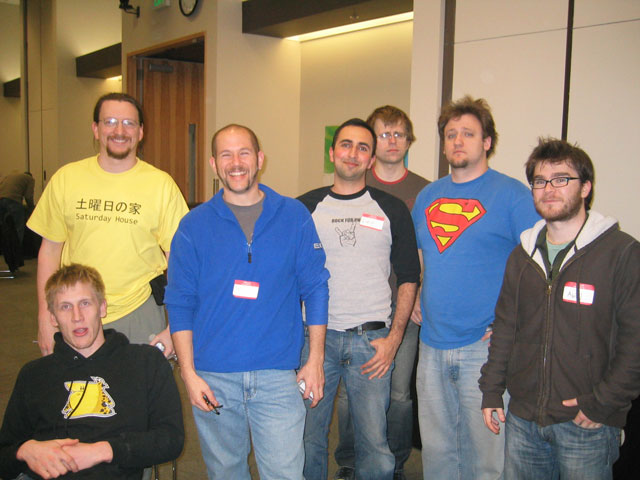
Some of the core dev team members (taken at the end of the event). We can still smile! _I’m the guy in the second row with glasses and the black shirt 3 from the right. _
What About Django for Seattle Startup Weekend?
We’ve picked our company product, and have 2 days to finish it during Startup Weekend.
The dev team inventoried its skills and discovered the expected diversity of platforms, skills and languages for the 30+ back-end developers - PHP, Python, Ruby, and .NET. What strategy do we use to merge our skills and get the product developed?
I suggest Django for its easy of adoption possibilities among a very diverse technical crowd, and I provide a bit of rationale for others to consider:
We’ve setup a Linux server which likely means LAMP development (PHP, Python, Apache, MySQL) or Ruby on Rails for the final platform this will run on.
All developers could get setup and be running quickly on all major operating systems with a standard install of Python, Django and any SQL server one wanted, such as the quick-to-install SQLite. I plan on developing completely on my laptop, and getting code to the server via subversion updates.
I’m a strong Python developer who spends my time primarily in Zope and Plone - and haven’t yet used Django - but there are experts in the room, and anyone who can write an object class and learn some basic Python can get something up and running - or at minimum could read someone else’s code and become productive. I gained some quick familiarity by reading a Django book on the bus ride home tonight!
There are no technology majorities in the group – but I think everyone ramping up on Ruby on Rails, .NET (if someone brings a Windows Server) or Zope/Plone seem slim for a 2-day event. Django seems like only an hour or two away from general productivity. Plus documentation is on the web.
PHP could also be possibility, but not sure what framework we’d use.
Ruby on Rails may also fall into the camp of non-Ruby developers being able to hack existing code setup by Ruby on Rails experts, but I still think it may require more learning than we have.
I’ve been enjoying all the conversations, idea brainstorming, and seeing some familiar faces (such as Josh Livni and Brian Dorsey) while also meeting many new people!
What do you think? Have a look at Django here: http://www.djangoproject.com/
I look forward to seeing what direction we take tomorrow when coding commences!
And special thanks to those who stayed late to setup the server, trac and subversion.
What Is Collective MetaNav?
To help illustrate MetaNav, I’ve created two screencasts:
MetaNav Overview screencast (direct link to full-size version)
Plone Walk-through of MetaNav screencast (direct link to full-size version)
Briefly, this product allows Plone administrators and content-editors to build and maintain an alternate navigation hierarchy for their site, such as in audience-based and topic-based navigation schemes.
For more information and to download latest release, see http://plone.org/products/metanav
Safe Travels to Naples!
I wanted to wish Plonistas a safe journey to Naples for what will be another fantastic Plone conference!
Back in Seattle, we’re looking forward to hearing post-conference highlights at our upcoming Halloween Plone Meeting.
I’m particularly excited for five Seattle-area Plonistas (that I know of) who are presenting this year. After seeing previews of two of these presentations in September, I know conference attendees are in for a treat:
Andrew Burkhalter, Jon Stahl, and Veda Williams from ONENW are presenting on a nice range of topics spanning from those new to Plone 3 all the way through advanced Plone skinning, development and integration.
Jonathan Callahan will be presenting Plone for Government Science – How to get buy in from managers, security watchdogs and colleagues.
Paul Bugni will be presenting Where’s the source, Luke? : How to find and debug the code behind Plone.
The CollectiveGTD Project (and Sprints in Naples)
Encouraged by excellent suggestions from the Plone community, Derek and I checked out some of the open-source products including pyGTD, Chandler, and Plone Extreme Management. And combined with the plethora of interesting proprietary solutions, it was obvious there are many directions an open source GTD project can take.
To help organize this project, and make it inclusive for others to participate, we have created two CollectiveGTD projects sites - one for the Plone project, and one for general Open Source GTD in Python code libraries, overall documentation, etc.
The wiki contains early brainstorms and specs, and we’ve posted a first-generation mockup. This Friday we start coding a base implementation in Plone.
While this is primarily a Plone project, we’ve organized the project into several separate projects to allow the pieces to be mixed and matched in various ways. We want to push as much functionality into straight Python as possible so that it can be used outside of Plone as well.
I have not played with Chandler yet, but it does seem like a potential treasure chest. It’s open-source, written in Python, has both a desktop and server portion – and has gone through a lot of research and development. An early concern is that it may be too heavy for our current needs – we’re not sure we want one tool to do it all, but rather parts we can mix and match. Though integrating Chandler with Plone does sound like an interesting idea (as Lee Joramo suggests).
Sprints?
I won’t be at the Naples conference, but two related sprints of interest:
Stefan Eletzhofer mentioned potentially sprinting in Naples. _Derek and I will be coding in Seattle on Friday, though we can possibly attend the weekend sprint remotely. Though it may be difficult since we’re 9 hours behind Naples… _
I noticed a registered sprint for the Plone Extreme Management Tool. I look forward to seeing how this project evolves – it’s different than what we’re currently envisioning for CollectiveGTD, but some of the concepts and technologies overlap and I hope can leverage from each other.
Collaborative GTD for Python and Plone
A roundtrip flight from Seattle to the East Coast is all you need to start your next Python pet project. (Remember to take some vacation in between though!)
I used this time to start development on a python library for the Getting Things Done (GTD) methodology. I’ve been practicing GTD over the last couple of years using a variety of tools, but just haven’t found the right one - my current favorite is iGTD (OSX). There are several others. I also use tools that have some parallels, like Basecamp.
The GTD apps I’ve used are missing one major feature. They’re sophisticated but not open source, which means I can’t tweak it to do what I really want, and have been waiting awhile for some fixes that I need.
The idea is to build a pure python library, which could be used by itself if desired. On top of this we plan to build a Plone 3.0 version.
Currently the Python library (in alpha, licensed under GPL3) handles core GTD tasks and some early task management. Derek Hoshiko (also an owner at Web Collective, Inc) and I have been brainstorming some ideas for a web-based multi-user version of the GTD framework.
Ultimately, GTD is great for individuals but what might a web-based version of GTD look like in a multi-user team environment, where you could also see and interact with others’ tasks? Can we use this for our internal team project scheduling, availability, task management, and status reporting? We plan to find out.
If you’re interested in collaborating on this project, please contact us.
Web Collective Featured in Sustainable Industries Journal
In one fell swoop, Eric Magnuson’s interview in SIJ’s Five under 35 article highlights the recent formation of our company Web Collective Inc – as well as connections around worker-owned cooperatives, Seattle’s Business Alliance for Local Living Economics (BALLE) chapter, and the Sustainable MBA Program at Bainbridge Graduate Institute.
Many of us in Web Collective met through our connection with BALLE Seattle and our work around creating thriving local economies. Prior to that I ran across the newly forming national BALLE organization while completing graduate work through the Center for Creative Change at Antioch University Seattle in 2001. Around that time I also stumbled on the world of open source and Zope (and soon Plone) - which quickly became the core of my business. A lot can happen in 5 years!